3D Bat Locker2.2
Publisher Description
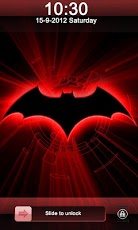
3D Bat Locker contains a beautiful shadow wallpaper of Bat i.e. species of mammals, with red colored outline and an effect of light being thrown by Bat as does the fireflies making the background colorful from black to the shade of red on it.It gives a wonderful and unique look to your Android Phone. It is a true replica of an IPhone Locker, so to enjoy the look and feel of Iphone download this FREE 3D Bat GO Locker as your Android Locker.Features: • HD image of Bat- the flying mammal.• 3D bat locker for android is free to install• Locker theme with matching slider.Instructions:• Go to MENU->Preferences->Theme Settings—>GO Locker -> 3D Bat Locker.• Exit the appNote: This app is free to install but may contain icons and push ads.Keywords: 3D Bat locker, flying mammal wallpaper, free locker for android, HD theme .
About 3D Bat Locker
The company that develops 3D Bat Locker is Locker Screen Theme Expert. The latest version released by its developer is 2.2. This app was rated by 3 users of our site and has an average rating of 3.7.
To install 3D Bat Locker on your Android device, just click the green Continue To App button above to start the installation process. The app is listed on our website since 2012-10-09 and was downloaded 21 times. We have already checked if the download link is safe, however for your own protection we recommend that you scan the downloaded app with your antivirus. Your antivirus may detect the 3D Bat Locker as malware as malware if the download link to com.lockerscreenexpert.batlocker is broken.
How to install 3D Bat Locker on your Android device:
- Click on the Continue To App button on our website. This will redirect you to Google Play.
- Once the 3D Bat Locker is shown in the Google Play listing of your Android device, you can start its download and installation. Tap on the Install button located below the search bar and to the right of the app icon.
- A pop-up window with the permissions required by 3D Bat Locker will be shown. Click on Accept to continue the process.
- 3D Bat Locker will be downloaded onto your device, displaying a progress. Once the download completes, the installation will start and you'll get a notification after the installation is finished.
Program Details
System requirements
Download information
Pricing
Version History
version 2.2
posted on 2012-10-09
Several fixes and updates
